Key Takeaways
- AI agents now resolve customer queries end-to-end, processing refunds, updating accounts, and completing multi-step workflows autonomously.
- Two-thirds of service teams run at least one AI agent, and 70% saw measurable value within 60 days of deployment.
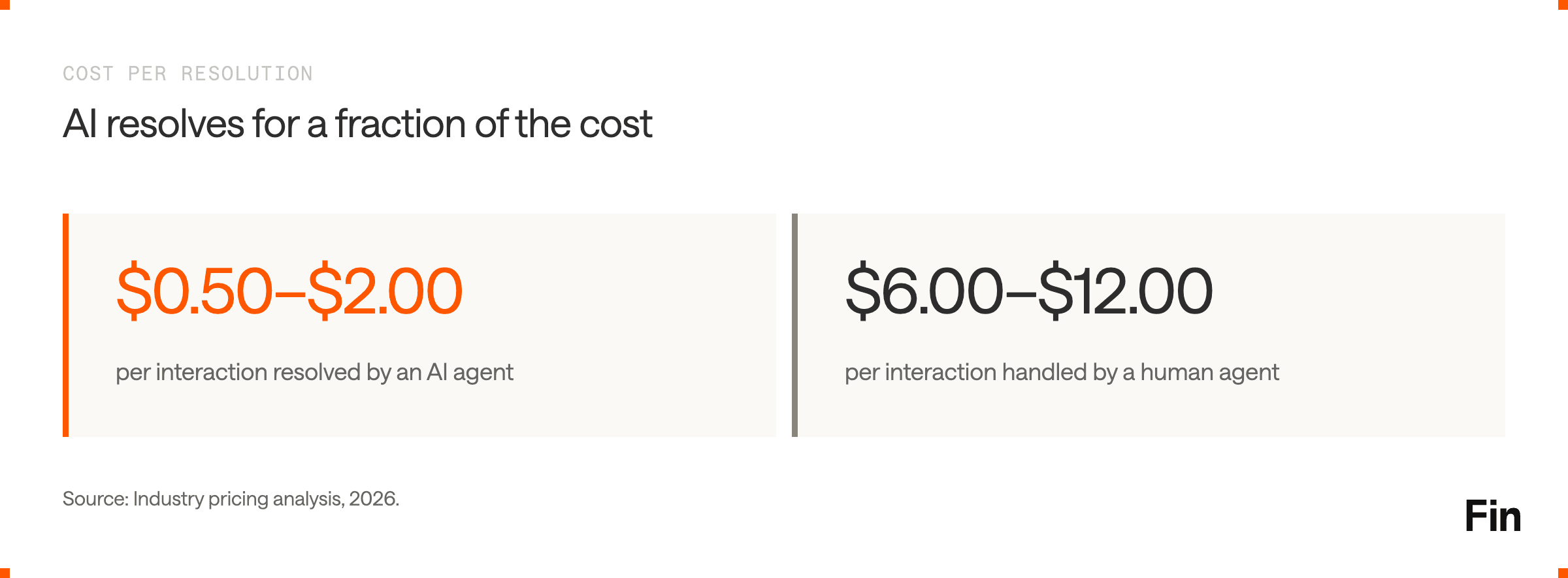
- AI resolutions cost between $0.50 and $2.00 per interaction compared to $6.00 to $12.00 for human agents.
- The hybrid model wins: AI handles volume and routine complexity while humans focus on high-judgment, relationship-driven work.
- By 2029, Gartner predicts agentic AI will resolve 80% of common customer service issues without human intervention.
What Is AI Customer Service?
AI customer service is the use of artificial intelligence to handle, route, and resolve customer inquiries across channels like chat, email, voice, WhatsApp, and social media. In 2026, this means AI agents that reason through problems, pull data from backend systems, take actions, and resolve issues without a human touching the ticket.
The distinction from earlier chatbots matters. Rule-based bots followed scripts: if the customer says X, respond with Y. Modern AI agents operate on reasoning. They read the full conversation context, access order management systems, CRM data, and knowledge bases, then generate responses tailored to each customer’s specific situation. When a query exceeds their scope, they escalate to a human with complete context attached.
This shift has been driven by advances in large language models (LLMs), retrieval-augmented generation (RAG), and orchestration architectures that coordinate multiple AI capabilities within a single conversation.
Why AI Customer Service Matters Now
The economics of customer service have reached an inflection point. Support costs scale linearly with headcount. Customer expectations do not wait for hiring cycles.
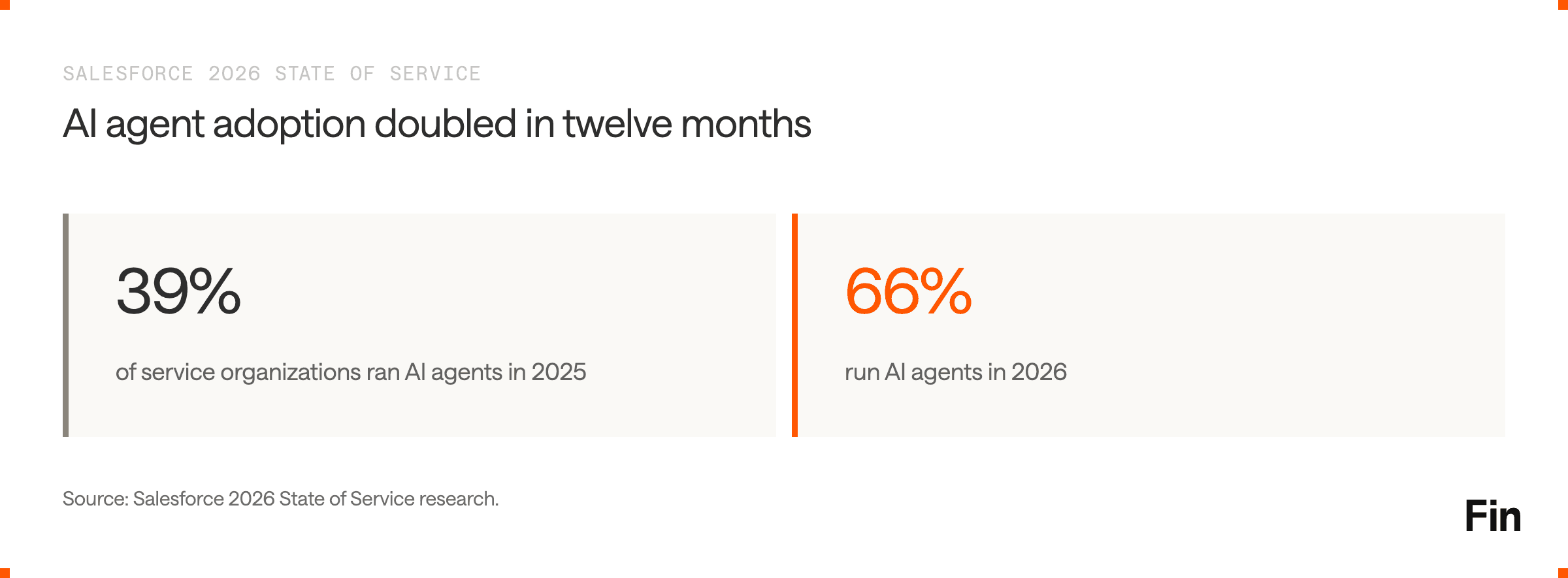
According to Salesforce’s 2026 State of Service research, 66% of service organizations now run AI agents, up from 39% a year earlier. That adoption rate doubled in twelve months. A Gartner survey of 321 customer service leaders found 91% are under pressure from senior leadership to implement AI in 2026.
Four forces are converging:
Customer expectations have outpaced service delivery. Zendesk’s CX Trends 2026 report, based on 11,000+ consumer surveys across 22 countries, found that 81% of consumers want support to continue where they left off without repeating themselves, and 86% say responsiveness and accuracy strongly influence purchasing decisions.
The cost gap between AI and human resolution is widening. AI resolutions average $0.50 to $0.70 per interaction. Human agents cost $6.00 to $8.00. That is roughly a 12x cost advantage per ticket for routine queries.
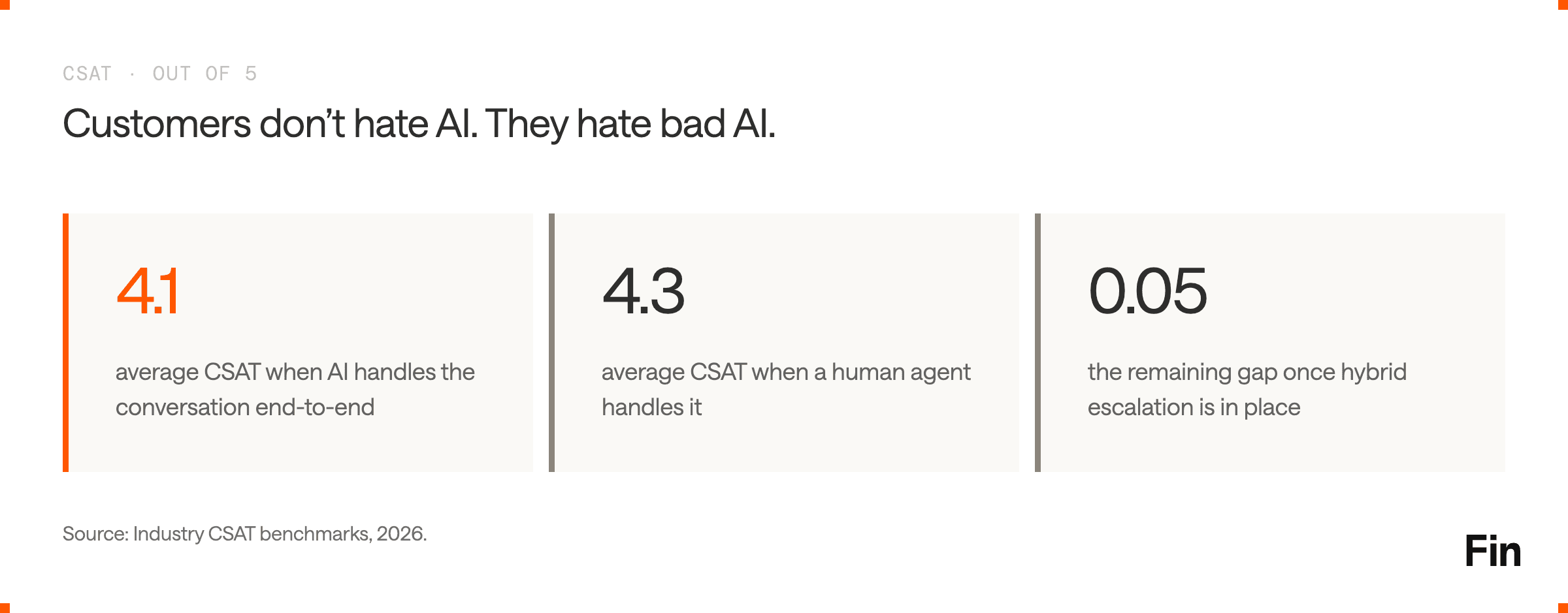
AI quality has crossed the threshold. Pure-AI handling now lands at 4.1/5 CSAT against 4.3/5 for human agents on average. Hybrid escalation flows narrow that gap to 0.05 points. Customers do not hate AI. They hate bad AI. Fast, accurate answers earn high satisfaction regardless of whether a human or an AI delivers them. That shift is showing up in what teams optimize for: 58% of customer service professionals now name improving customer experience and satisfaction as their top priority for the year ahead, more than double the 28% who said so a year earlier.
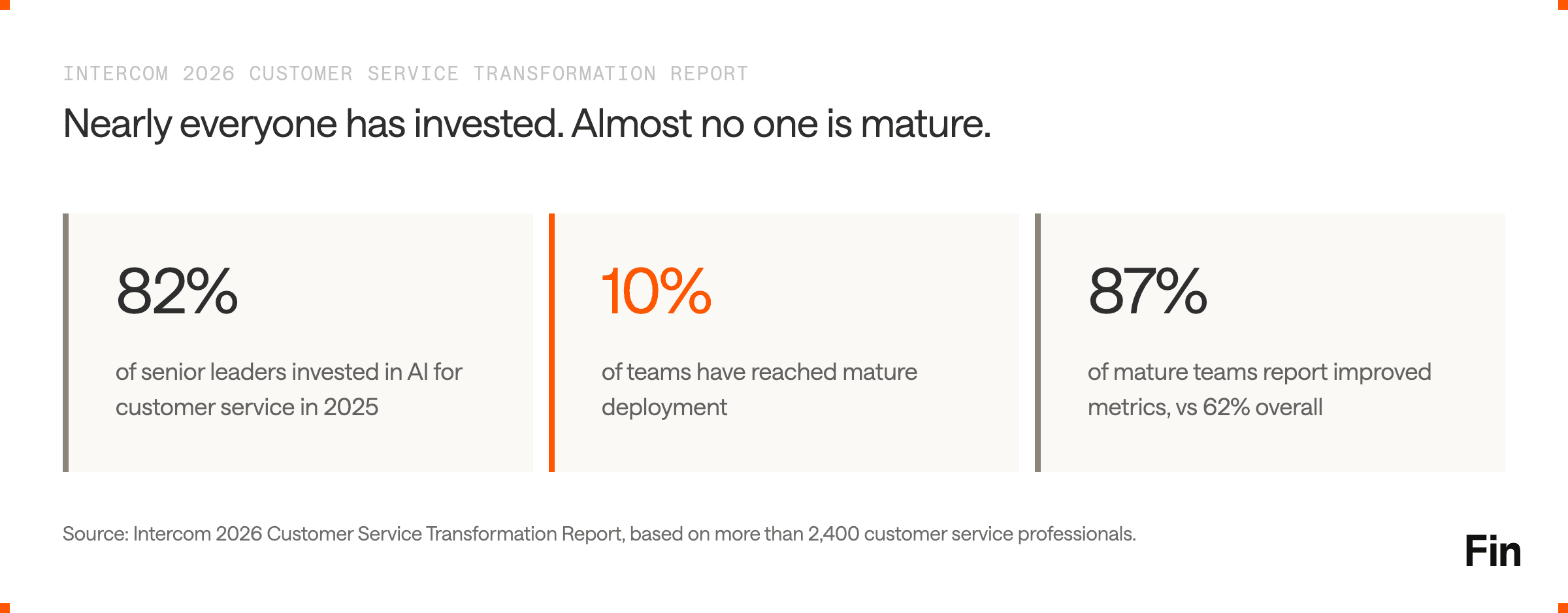
The gap is no longer adoption, it is depth. Intercom’s 2026 Customer Service Transformation Report, based on a survey of more than 2,400 customer service professionals, found that 82% of senior leaders invested in AI for customer service in 2025 and 87% plan to in 2026, but only 10% of teams have reached mature deployment, where AI is fully integrated into operations and working at scale. The difference shows up in results: 62% of all teams report improved service metrics after implementing AI, rising to 87% among teams with mature deployments. Teams at maturity are also nearly twice as likely as those still exploring to report higher quality and consistency across support.
How AI Customer Service Works
Modern AI customer service operates through a layered architecture. Understanding each layer helps you evaluate solutions and set realistic expectations.
Intent Understanding and Context Retrieval
When a customer sends a message, the AI agent parses intent using natural language processing. It goes beyond keyword matching: a customer typing “I’ve been waiting three days for my order” is not simply asking about shipping status. The AI recognizes dissatisfaction, checks urgency signals, and adjusts its approach.
The agent then retrieves relevant information from connected systems. This is where retrieval-augmented generation (RAG) comes in. Rather than relying solely on pre-trained knowledge, the agent pulls live data from your knowledge base, CRM, order management system, and billing platform to ground its response in facts specific to that customer.
Reasoning and Action
The best AI agents do not stop at providing information. They take action. Processing a refund, updating a shipping address, verifying identity, canceling an order: these are the workflows that used to require a human in the loop. Agentic AI systems combine reasoning with tool use, executing multi-step workflows while applying business logic at each decision point.
This is the core distinction between a chatbot and an AI agent. A chatbot tells you where to go. An agent completes the task.
Escalation and Handoff
Good AI agents know their limits. When a request requires empathy, negotiation, judgment, or authority to resolve, the agent transfers to a human and passes along all context: conversation history, classification attempts, customer data, and suggested resolution steps.
This handoff quality matters enormously. According to a Gartner 2025 Customer Service Technology report, human agents who receive escalations with full AI-prepared context resolve them 35-45% faster than agents starting from scratch.
Continuous Improvement
The most effective AI customer service systems improve automatically. Each resolved query, each piece of feedback, each correction feeds back into the model. Leading platforms report measurable month-over-month gains in resolution rate through this continuous improvement loop.
Core AI Customer Service Capabilities
The capabilities that matter in 2026 have shifted beyond simple FAQ deflection. Here is what to evaluate.
Omnichannel Resolution
Customers reach out via chat, email, phone, SMS, WhatsApp, Instagram, and Slack. An AI agent should handle requests across all of these channels with consistent quality and shared context, so a customer who starts in chat and follows up by email never repeats themselves.
Voice is an increasingly important channel. Traditional IVR menus are being replaced by AI voice agents that understand natural language, carry context, and resolve issues over the phone. For teams evaluating voice capabilities, the complete guide to AI voice agents covers the current landscape.
Complex Query Handling
Resolving password resets and order tracking is table stakes. The real test is whether an AI agent can handle multi-step workflows: verifying a customer’s identity, checking eligibility for a refund, processing the refund, sending a confirmation, and updating the CRM record. These queries used to absorb 15 to 30 minutes of agent time each.
Procedures (or agent operating procedures) define exactly how the AI handles these complex workflows, combining natural language instructions with deterministic controls. When evaluating agents, ask how they handle complexity: through scripted decision trees or through genuine reasoning with guardrails. The difference determines whether you automate 30% of your volume or 70%.
Knowledge Management
An AI agent is only as good as its knowledge sources. The best systems learn from help center articles, internal documentation, PDFs, past conversations, and live data from connected systems. Maintaining this content is not a one-time project. It is continuous infrastructure. Teams that treat knowledge management as a core function see compounding improvements in resolution rate.
AI-Powered Insights
Traditional CSAT surveys capture maybe 5-10% of interactions and tend to reflect extremes. AI-powered quality scoring can evaluate 100% of conversations automatically, providing a complete picture of service quality without survey fatigue. This shifts quality management from spot-checking to systematic observability.
The ability to surface conversation topics, detect anomalies, and recommend specific improvements closes the gap between “we know something’s wrong” and “we know exactly what to fix.”
Human-AI Collaboration
The hybrid model consistently outperforms both full automation and human-only support. AI handles volume. Humans handle judgment. AI copilot tools that assist human agents during live conversations, by drafting replies, surfacing knowledge, and summarizing context, create a multiplier effect. Teams using copilot features close significantly more conversations daily than those working without AI assistance.
What AI Customer Service Costs
Pricing varies significantly across vendors and models. Understanding the structures helps you forecast accurately.
Per-Resolution Pricing
You pay only when the AI fully resolves a conversation without human intervention. This aligns cost directly with value delivered. If the AI cannot resolve the issue, you do not pay. Fin, for example, charges $0.99 per outcome.
Per-Conversation Pricing
You pay for every conversation the AI handles, regardless of whether it resolves the issue. This model can inflate costs if the AI handles many conversations but resolves few. Some vendors charge $0.50 to $2.00 per conversation.
Per-Session Pricing
Some platforms charge per session regardless of outcome. Freddy AI (Freshworks) charges $0.10 per session at $100/1,000 sessions. Multiple sessions may be needed for a single issue, making the true cost-per-resolution higher than the per-session price suggests.
Platform Fees and Seats
Enterprise solutions often layer a per-seat or per-agent fee on top of usage charges. Salesforce Agentforce charges $2.00 per conversation plus Data Cloud platform costs. Enterprise-only vendors like Sierra and Decagon charge $150,000 to $400,000+ annually with custom contracts.
For a detailed breakdown of how these models compare at different volumes, the AI customer service pricing comparison guide runs the math across vendor tiers.
AI Customer Service by Industry
Resolution rates and automation potential vary by the structure of your support queries.
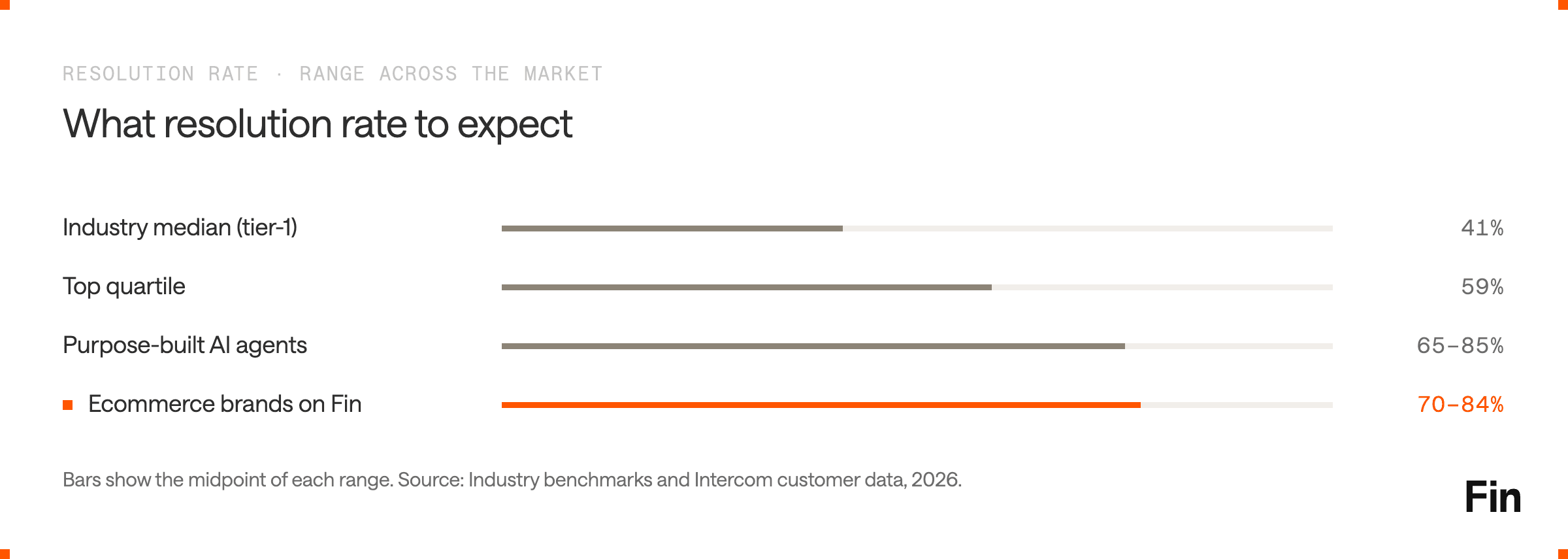
Ecommerce is a natural fit. Order status, returns, shipping, and product questions are high-volume and well-structured. Ecommerce brands regularly achieve 70-84% resolution rates. AI agents for Shopify merchants can now handle both support and shopping assistance in a single conversation, guiding product discovery and resolving post-purchase issues without handoffs.
Financial services demands precision and compliance. AI handles balance inquiries, transaction disputes, and account updates while adhering to regulatory requirements. Compliance certifications like SOC 2, ISO 27001, and ISO 42001 for AI governance are non-negotiable in this vertical.
SaaS and technology companies face a wider range of query complexity, from billing questions to technical troubleshooting. Resolution rates typically land between 50-70%, with the gap driven by the complexity of product-specific queries.
Healthcare requires HIPAA compliance and careful handling of patient data. AI excels at appointment scheduling, insurance verification, and general inquiries but must route clinical questions to qualified staff.
How to Evaluate AI Customer Service Solutions
The vendor landscape is fragmented and claims overlap. Here is how to cut through.
Resolution Rate, Not Deflection Rate
Deflection measures whether a query avoided reaching a human. Resolution measures whether the customer’s issue was actually solved. These are different numbers, and the gap between them is where customer trust lives or dies. A deflected conversation that is not resolved still costs you: through repeat contacts, churn, and eroded satisfaction. Understand how each vendor defines and measures resolution before comparing numbers. Resolution rate benchmarks and methodology differ significantly across the industry.
Test With Your Data
Vendor demos use curated scenarios. Production support queues do not. Run any AI agent against your actual customer conversations: the complex ones, the vague ones, the emotionally charged ones. If a vendor cannot support a live or sandbox evaluation using your real data, that is a signal.
Self-Manageable vs. Vendor-Dependent
Some platforms require professional services for every configuration change. Others let CX teams iterate daily without engineering support. The speed at which you can update knowledge, adjust tone, modify workflows, and test changes determines how fast your AI improves. Look for platforms where non-technical teams own the full cycle from training through deployment.
Total Cost of Ownership
Per-resolution pricing looks clean until you factor in platform fees, seat costs, integration work, and professional services. A vendor charging $0.50 per resolution plus $50,000 in annual platform fees may cost more than one charging $0.99 per resolution with no platform fee. Run the full TCO calculation at your expected volume. The TCO calculator for AI agents breaks this down across vendors.
Security and Compliance
Enterprise deployments require SOC 2, ISO 27001, and increasingly ISO 42001 for AI governance. Data encryption at rest and in transit, configurable retention policies, role-based access controls, and audit logging are baseline requirements. Ask specifically about hallucination controls, PII handling, and whether customer data is retained by third-party LLM providers.
The Implementation Playbook
The most common mistake is trying to automate too much at once. Start focused, prove value, and expand.
Step 1: Identify Your Highest-Impact Use Cases
Audit the past 90 days of support tickets. Group by type and identify the top 20 question types. These typically represent 80% of volume. Start with the queries that are high-volume, well-documented, and have clear resolution paths: order status, password resets, return policies, account updates.
Step 2: Prepare Your Knowledge Base
Your AI agent’s performance is directly proportional to the quality of your content. Audit existing help center articles for accuracy, clarity, and completeness. Remove outdated information. Fill gaps for the use cases you are targeting. Structure content so the AI can retrieve and synthesize it effectively. Teams that invest in knowledge management as ongoing infrastructure see their resolution rates compound over time.
Step 3: Deploy Narrowly, Then Expand
Launch with a focused set of use cases on one channel. Monitor resolution rate, CSAT, and escalation patterns for the first 30 days. Identify where the AI struggles, which usually points to content gaps or missing workflow steps. Fix those gaps, retest, and expand to additional use cases and channels.
Step 4: Build the Improvement Loop
The organizations seeing the highest returns treat AI optimization as a continuous discipline, not a launch-and-forget project. Review unresolved conversations weekly. Track which topics drive the most escalations. Feed insights back into content and configuration. This cycle, sometimes called a flywheel, is what separates teams automating 40% of their volume from those reaching 70%+.
The Role of Humans in AI-First Customer Service
AI does not replace customer service agents. It changes what they do.
When an AI agent handles the majority of routine and even moderately complex queries, human agents are left with the work that genuinely requires their judgment: escalated complaints, sensitive situations, VIP relationships, and edge cases that no knowledge base fully covers.
This shift has implications for team structure. Intercom’s 2026 Customer Service Transformation Report found that organizations are reallocating existing staff into AI-focused roles or hiring for entirely new skillsets, with roles emerging that did not exist two years ago: AI operations leads who own agent performance, knowledge managers who maintain the content that powers AI, and conversation designers who shape how the AI communicates. The report also found that 28% of teams with mature AI deployments spend less time handling support volume, against 16% of teams at the initial deployment stage. Traditional metrics like average handle time and cases closed become less relevant when the human queue consists entirely of complex, high-effort interactions.
The teams that are scaling AI most effectively are not cutting headcount first. They are redeploying human capacity toward system improvement and high-value interactions. For a deeper look at how this plays out in practice, the guide to AI agents vs. human agents covers the hybrid model in detail.
Why Teams Choose Fin for AI Customer Service
Fin is the AI agent built for customer service, trusted by 12,000+ businesses to resolve over 2 million conversations per week.
Three things set Fin apart from other AI customer service solutions.
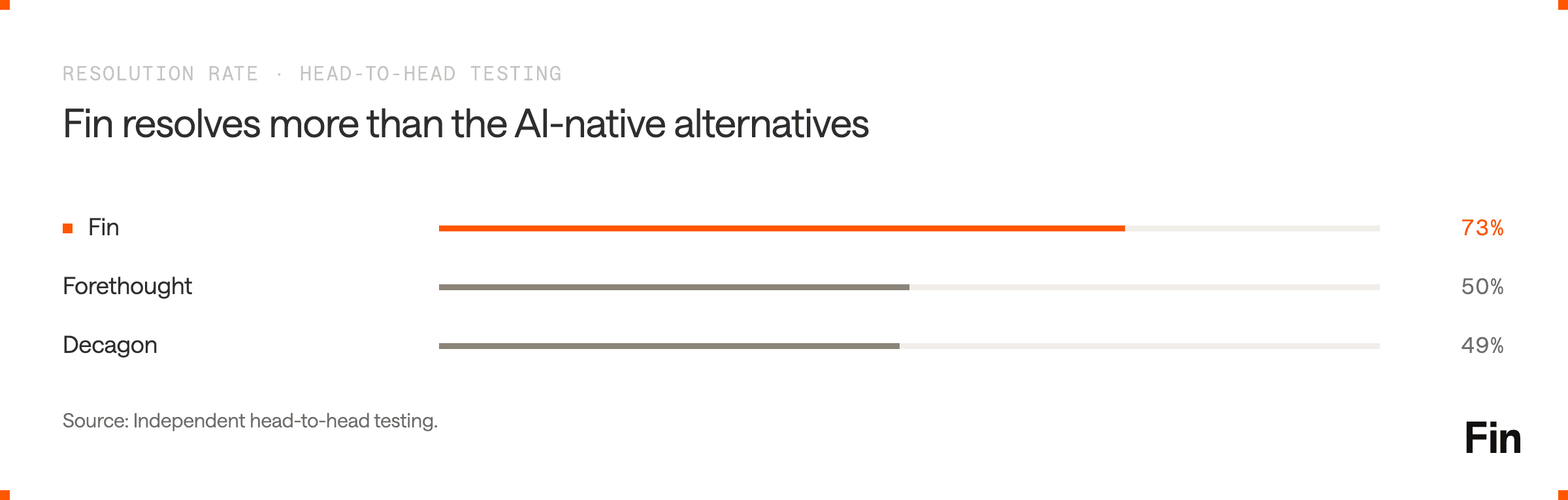
The highest resolution rates in the category. Fin averages a 76% resolution rate across all customers, improving approximately 1% per month over the past 24 months. In independent head-to-head testing, Fin delivered a 73% resolution rate against Decagon’s 49% and Forethought’s 50%. This performance is powered by the Fin AI Engine, a proprietary architecture with purpose-built retrieval and reranking models specifically engineered for customer service.
The only AI agent with a native helpdesk. Fin operates within the Intercom platform, which includes AI agent, helpdesk, inbox, knowledge management, workflows, and reporting in a single system. When Fin cannot resolve an issue, the handoff to a human agent is seamless: full context, conversation history, and AI-generated summaries transfer automatically. No stitching together separate tools. No lost context. AI-native competitors like Ada, Sierra, and Decagon require a separate helpdesk for human support, creating handoff friction and fragmented data.
Self-manageable by design. CX teams configure, test, and iterate on Fin without engineering support. Procedures define complex workflows in natural language. Simulations validate performance before anything reaches a customer.
The Fin Flywheel, a four-stage cycle of Train, Test, Deploy, Analyze, gives teams direct control over continuous improvement. Setup takes days, not months. Transparent pricing at $0.99 per outcome means you pay only for conversations Fin actually resolves.
Fin also works with your existing helpdesk. Native integrations with Freshdesk, Salesforce, and HubSpot mean you can deploy Fin’s AI resolution capability without replacing your current platform.
Customer Quotes:
“We knew Fin wouldn’t succeed in a vacuum. It needed to be part of how we worked, not a layer on top.” — Isabel Larrow, Product Support Operations Lead, Anthropic
“It’s not magic. If you invest in understanding, adoption, and great content, AI performance takes off.” — Yamine Gluchow, VP of Information Systems, Lightspeed
“Fin is part of our process now. We update articles constantly, we coach it, it’s built into our DNA.” — Jaymee Krauchick, Assistant General Manager, Peddle
FAQ
How much does AI customer service cost?
Pricing models vary. Per-resolution pricing (like Fin at $0.99 per outcome) charges only when a query is fully resolved. Per-conversation models charge for every interaction regardless of outcome. Enterprise platforms charge $150,000+ annually with custom contracts. The total cost depends on your volume, complexity, and which pricing model aligns with your goals.
What resolution rate should I expect from an AI agent?
Industry medians for tier-1 deflection sit around 41%, with top-quartile teams reaching 59%. Purpose-built AI agents with strong knowledge bases and action capabilities regularly achieve 65-85% resolution rates. Ecommerce brands on Fin achieve 70-84%. The key factor is content quality and how much meaningful work you trust the AI to handle.
Will AI replace human customer service agents?
No. AI handles volume, routine complexity, and the structured queries that consume most of a support team’s time. Human agents shift to high-judgment work: escalated complaints, VIP relationships, system improvement, and the interactions that require empathy and authority. Gartner predicts 50% of companies that cut support staff due to AI will rehire by 2027.
How long does it take to implement AI customer service?
Self-managed platforms can be deployed in days to weeks. Vendor-led enterprise implementations typically take 3-6 months. The biggest variable is content readiness: teams with a well-maintained knowledge base deploy faster. Start with a narrow set of use cases and expand as the AI proves itself.
What security certifications should an AI customer service vendor have?
At minimum: SOC 2 Type II and ISO 27001 for information security. ISO 42001 for AI governance is increasingly important for enterprises deploying autonomous AI agents. HIPAA is required for healthcare. Ask about data encryption, PII handling, hallucination controls, and whether customer data is retained by third-party LLM providers.