
See weekly product updates for Fin AI Agent & Intercom Helpdesk.
Intercom Changelog & Release Notes | Product Updates

Bots
Support
Feature update
Branch on Conversation tags and Remove person tags 🏷️

Shared by Mark
• May 14, 2024
We've just released a small improvement to Tags in Workflows.
You can now use Conversation tag in the Audience Rule and Branches of Workflows. 💬
We've also added the Remove person tag action.

Apps & API
New
Even more Conversations data in API v 2.11 💬 📊

Shared by Liz
• May 09, 2024
The latest version of the Intercom API is live! Here's whats new:
- Enable data attributes to be updated through the Messenger with this flag
- Access metadata about your AI Agent's performance, including sources used, ratings, resolution state and more
- Define your own created timestamps for creating and replying to conversations
👉 Try out the API from the docs or Postman collection.

Messenger
Feature update
Support
Customers can now find and rate recently closed conversations directly in the Messenger 📈

Shared by Kim
• May 08, 2024
The Messenger home screen will now show conversations and tickets that were recently closed (up to 7 days ago).
This makes it easier for your customers to find all their recent conversations and tickets, and respond if a message is triggered after a conversation has been closed - such as when a CSAT survey is sent.
The release is aimed at helping you boost your CSAT response rate while improving the Messenger customer experience.
No action is required as the change will roll out automatically.

Messenger
Improved flexibility for Office Hours & Reply Times in the Messenger ⏰

Shared by Eve
• April 25, 2024
You now have more control over when and where Office Hours and Reply Times are displayed in the Messenger.
In addition to your existing option - displaying general office hours to customers before a conversation is assigned and team-specific times once a conversation is assigned, you can also now:
- Only show office hour and reply times after a conversation has been assigned to a team
- Hide office hours and reply times entirely
These additional options give you greater flexibility to display the right expectations across teams and ensure accuracy when communicating with your customers in the Messenger.
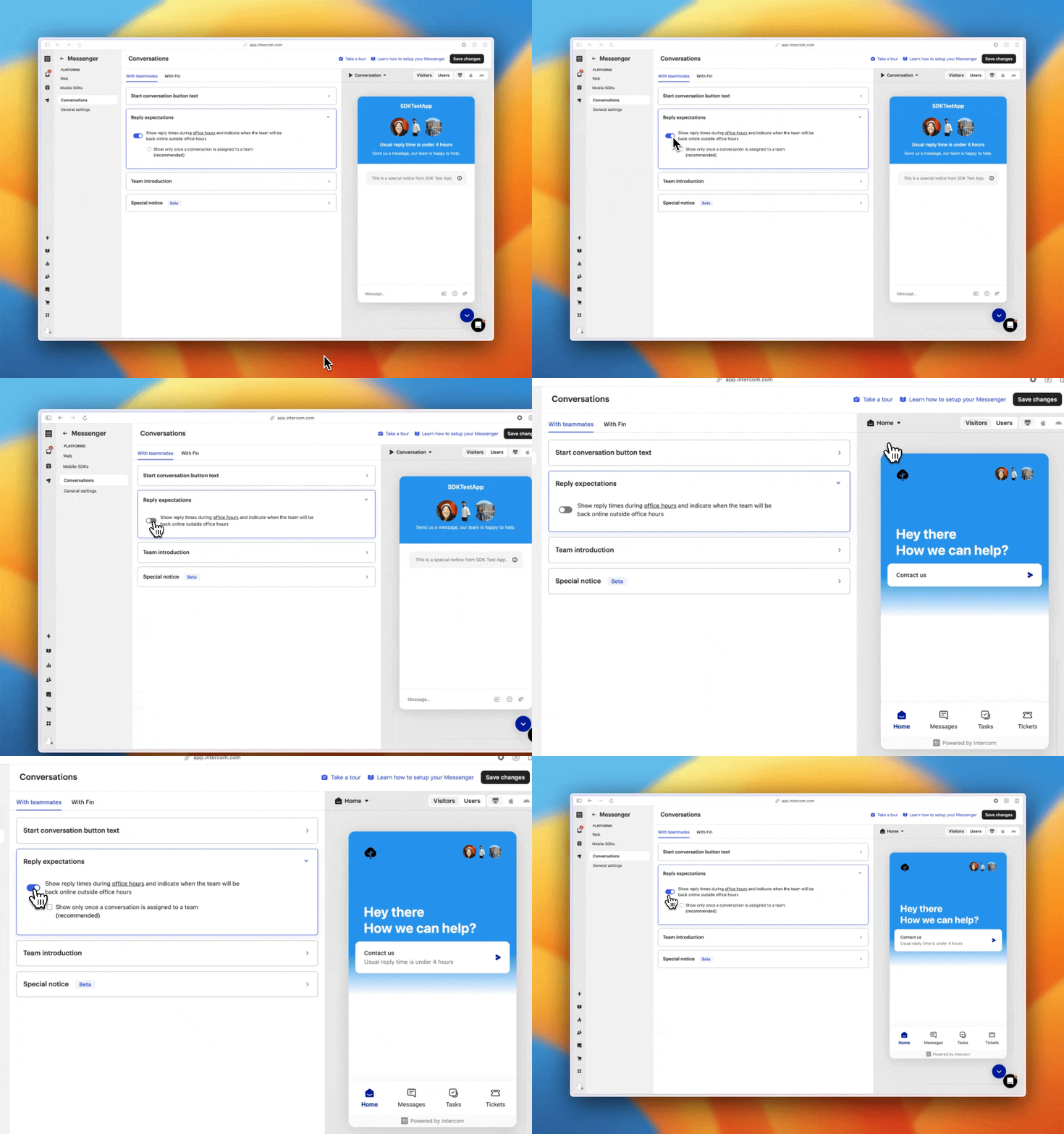
We have also made it easier for you to configure your office hours and reply times. We consolidated the UI to make sure it is easy to understand.
This is now available on Web, iOS (v16.5.0) and Android (v15.6.0).

Security & Settings
Link tooltips for all inbound conversations

Shared by Andrea
• April 17, 2024
To further reduce risk of teammates clicking malicious links from inbound messages, we’ve now expanded link tooltips and warnings to all channels (previously these applied to inbound email).
That means you’ll see tooltips for any links in Help Desk, with untrusted links highlighted in orange.
If you already set up trusted domains or changed link warning settings, these will now apply to all channels.

Security & Settings
Add trusted domains for inbound emails
Shared by Andrea
• March 28, 2024
Teammates with permission to manage security settings can now add trusted domains for inbound emails. This allows teammates to open links from domains you trust without interruption, whilst still staying alert to potential malicious links.
To save you time - we automatically trust your trusted messenger domains, help center domains, link branding domain, and your verified email domains.
You can also now manage link warnings at a workspace level.

Support
Product update
Phone
Enhance your Phone IVR with Call Overflow and Call Rating options

Shared by Peter
• March 27, 2024
Introducing two new ways to improve your IVR Workflows on Intercom.
- Call Overflow - You can now automatically route calls to a secondary team or configure one of our call deflection options (e.g. forward a call, send call to voicemail) directly on Workflows.
- Call Rating - We've also introduced a call rating step you can add to your IVR Workflows to help you gather valuable team performance data and customer feedback.

Support
New feature
Reporting
Export Your Chart Drill-In Data Directly to a CSV

Shared by Mark
• March 06, 2024
Following on from our new chart drill-in feature, we've now added the ability for users to export data from the drill-in table into a CSV file.
Advantages:
- Enhanced data analysis with spreadsheets: Get even deeper insights from your data by exporting to a CSV file.
- Streamline data extraction: Streamline the process of pulling your reporting data out of Intercom.
Tell us what you think & help us keep improving our reporting features – access the survey link directly within the feature.
Thanks,
Mark

Bots
Support
Feature update
Use the conversation rating to take action in Workflows
Shared by Mark
• March 04, 2024
Until now, Workflows would continue as soon as a Conversation rating (CSAT) survey was delivered—regardless of whether a customer had given a rating.
Now, you're able to Wait for customers to give a rating before continuing the Workflow—making it possible to branch your Workflows based on a customer's rating of the conversation.

With the new Wait for a conversation rating and the Conversation rating attribute, you can direct customers to different teams, request a review, or take various other steps, all based on their rating.

Mobile
Intercom Conversations mobile app now supports SAML SSO
Shared by Andrea
• March 01, 2024
To help more teams check and respond to customer feedback on the go, we’ve enabled SAML SSO for the Intercom Conversations mobile app on iOS and Android.
This will work for your account if you have SAML SSO available on your current pricing plan, and a SAML provider (like Okta or OneLogin) configured on your Intercom Workspace.