The safety of speed: How we ship code 180 times per day
Averaging 180 ships per day, Intercom releases 20 deployments every hour. Find out how we ship code constantly, recover quickly, and use velocity to drive stability.

“Speed is not the enemy of safety; it is the prerequisite for it.”
At Intercom, the average time from merging code to it being used by customers in production is just 12 minutes.
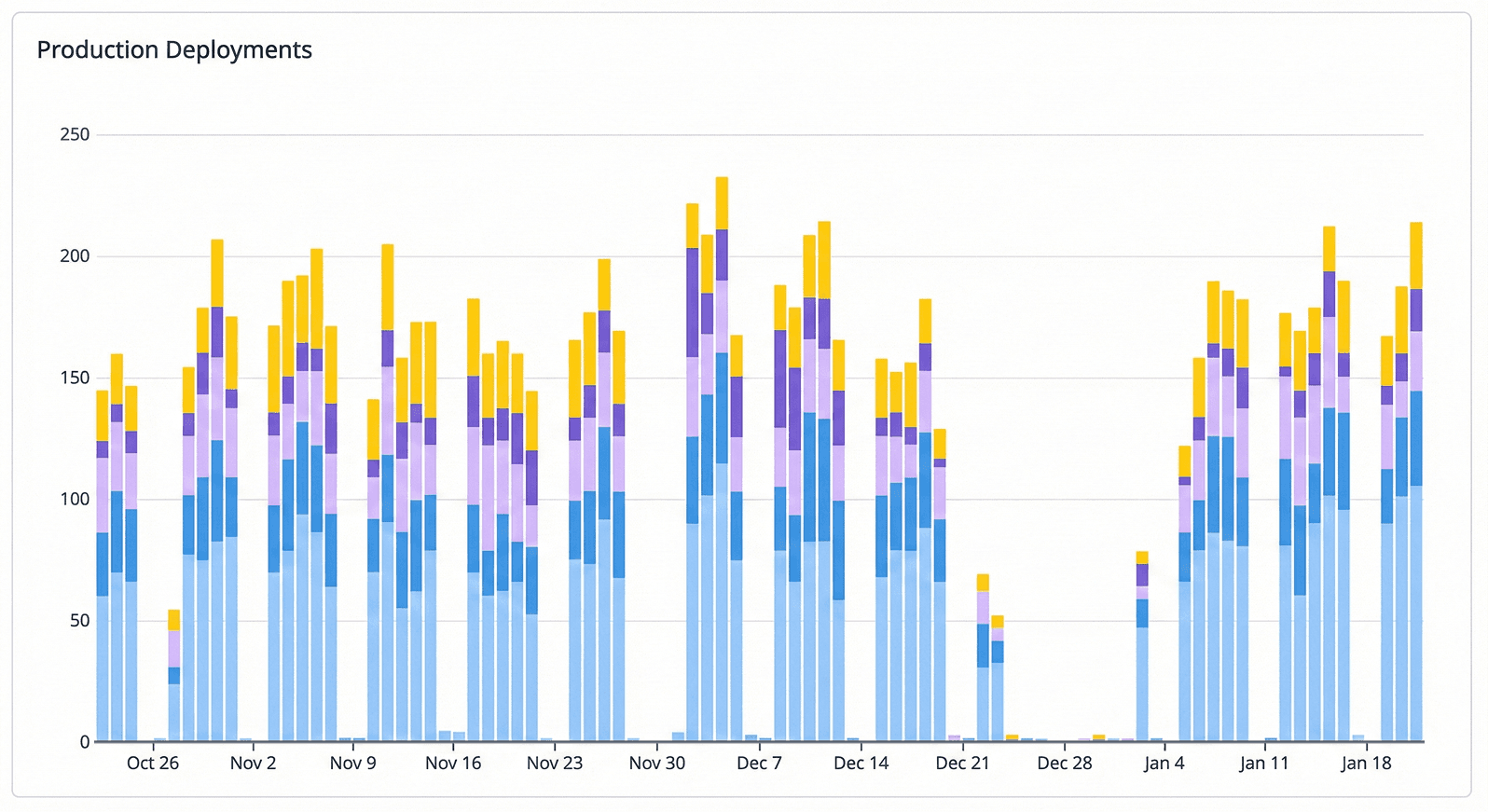
In January 2026, we are averaging 180 ships per workday – roughly 20 deployments every hour. Conventional wisdom suggests that to increase stability, you must slow down. We believe the opposite. At Intercom, speed is not the enemy of safety; it is the prerequisite for it. Accumulating code creates risk; shipping small batches minimizes it. Shipping is our company’s heartbeat.
Maintaining this frequency that fuels our product innovation, while targeting 99.8+% availability is a constant battle and has required over a decade of significant investment in systems, principles and processes. We protect the integrity of our systems through three distinct layers of defense: an automated pipeline that is simple, reliable and removes the need for manual intervention, a shipping workflow that promotes ownership and is flexible enough to provide guardrails that act as accelerants, and a recovery model optimising for mitigating inevitable failures. Here is how we’ve built each layer to ensure our velocity remains our greatest source of stability.
While Intercom consists of various services and frontend applications, this post focuses on our Ruby on Rails monolith. It is our core application and the one we deploy most frequently; we also deploy it to three different data-hosting regions with independent pipelines. While our other services (such as our Intercom UI) follow similar pipeline principles and safeguards, the Rails monolith is the best example of how we ship code at our scale.
The automated pipeline
Designed to move code from merge to production as fast as possible while enforcing strict safety checks, our pipeline is optimized for speed and safety and is entirely automated with the majority of releases requiring no human intervention.
Build and parallel testing
The process begins when an engineer merges code to GitHub. Two things happen immediately:
- The build: We compile the Rails application and its dependencies into a deployable asset that we call a slug. This takes four minutes.
- Parallel CI: Our test suite runs in parallel with the build. Through extensive optimization, parallelization and test selection, the vast majority of CI builds finish in under five minutes.
Pre-production verification
Once built, the slug is deployed to a pre-production environment. CI does not block the progression of the slug to pre-production. Deploying to pre-production takes around two minutes. This environment serves no customer traffic, but it is connected to our production datastores and mirrors our production infrastructure variants (e.g. web serving, asynchronous worker) and is configured in a way that requests will exercise the pre-release code/workers.
Immediately after deployment we run and await the result of several automated approval gates to verify the release. These answer questions including:
- Boot test: Does the application initialise correctly on the host?
- CI check: Did the parallel test suite pass?
- Functional synthetics: We use Datadog Synthetics to run browser-based tests on critical flows, like loading or editing a Fin workflow.
If any gate fails, the release is halted and does not go to production.
Production rollout and rolling restarts
Once the slug is approved for production, the code is promoted to thousands of large virtual machines. We use a deployment orchestrator to trigger these deployments simultaneously, but the actual rollout is decentralised.
This provides a staggered rollout, ensuring the entire fleet doesn’t change state at the exact same millisecond. Within these large virtual machines, we use a rolling restart mechanism at the process level:
- An individual process with the old code is taken out of the customer-serving path
- It is allowed to finish its current work and terminate gracefully once idle
- It is replaced by a fresh process running the new code and returned to the serving path
This process ensures that from the moment a deployment starts, the first requests are being served by new code within ~2 minutes. Within 6 minutes, the vast majority of our global fleet has been transparently updated without any downtime. When the restart is triggered on every machine, the pipeline unblocks production so the next deployment can begin.
Monitoring pipeline health
If a piece of code doesn’t pass every safety check, it is automatically rejected before it ever touches a production server. Additionally we treat a stalled pipeline as a high-priority incident; if the automated system rejects three consecutive release attempts, it triggers a page to an on-call engineer.
To a customer, waiting for three failures might sound like a lot, but these are pre-production blocks. We page a human at this stage because if the shipping lane stops moving, code changes begin to pile up. Our stability relies on building and shipping in small steps. If the pipeline stays blocked, those tiny steps merge into a large changeset which increases the risk of the next deployment. We page an engineer to fix the pipeline so we can return to the small, safe, and frequent updates that keep our systems stable.
The shipping workflow
While our pipeline is highly automated, the responsibility for the quality of our code lies with the engineer, not the tools. The decision to merge is a human one. Our workflow is built on the principle of extreme ownership; the engineer who writes the code is accountable for its success in production.
Be present when you ship
A core tenet of our culture is that you must be present when you ship. There is a practical benefit to our 12-minute deployment cycle: it keeps the engineer “in the zone.” When a deployment takes hours, engineers naturally move on to the next task, a meeting, or a lunch break. By the time their code hits production, their context is gone and they aren’t watching anymore.
By keeping deployments fast, we ensure the engineer is still focused on the problem they just solved. To support this, our deployment system provides:
- Notifications: Automatically messages the engineer on Slack the moment their code is submitted and as it moves through the stages.
- Observability links: Includes direct links to relevant dashboards and logs in every PR and Slack message.
- Prompted verification: Encourages the engineer to actively “watch the dials” and test their feature as it goes live. It is not acceptable to rely on “green builds”. You’re expected to watch your change go live and if you’re not prepared to rollback, you’re not prepared to ship.
We foster a no-blame culture focused on engagement. When we see an engineer trigger a rollback or open a revert immediately after a deployment, we don’t see it as a failure, we see it as a hallmark of an engineer who is actively watching their metrics and taking responsibility for the system’s health.
Feature flags
We make extensive use of feature flags to turn deployment into a non-event. By decoupling deployment (moving code to servers) from release (turning features on), we remove the blast radius of a new feature. Flags can be enabled for all customers, a specific subset, or disabled for everyone in under 60 seconds through our backend UI. Engineers can flag small or large ones, group flags together into beta features, initiate phased rollouts etc. We’ve also invested in ensuring that these feature flags can be used in other non-Rails monolith applications. Flags can allow subsets of users to be opted in to behaviors for testing before wider release, protect against risky changes and everything in between. They’re heavily used at Intercom; we created over 560 flags in the past three months, and we actively manage them so they don’t turn into permanent complexity.
Experiment with GitHub Scientist
For complex refactors and especially ones where behaviour should not change, we leverage GitHub Scientist, an open source experimentation library. This allows us to run “candidate” logic (the new code) in parallel with “existing” logic (the old code) in production. Scientist auto-instruments both paths, comparing results and timing metrics in the background. Because only the existing behaviour is shown to the customer, we can iterate on and verify the new code under real production load without any risk to the user experience. When we’re confident that the candidate logic is correct, we can then seamlessly switch.
Manual verification
Before merging code, engineers have the ability to generate a slug and deploy it to a virtual machine. Engineers can detach a running production machine from the customer-serving path and deploy their slug to it, connecting to the machine for manual testing. Engineers can also put their pre-release slug on a customer-serving machine where it will serve a small percentage of jobs or web requests in the fleet. Single hosts allow us to quickly filter our observability to these hosts and compare/contrast with the production release and generally makes low-level changes simpler and safer.
We do this because staging is a simulation, but production is reality. No amount of pre-production testing can perfectly mimic the chaotic behavior of millions of users. By testing on a single production host, we validate our assumptions against real-world data without risking the entire fleet.
Our recovery model
The size and complexity of Intercom and how our customers use the product in different and novel ways cannot be replicated by traditional non-production environments and testing. These things are still very important and have their place in our pipeline but failure in production is inevitable. Some of these failures will result in product degradation for customers and fewer still will result in an outage.
At Intercom, our approach to recovery is defined by one core principle: Stop monitoring systems; start monitoring outcomes. Traditional monitoring tells you if a server is healthy; our recovery model tells us if our customers are healthy.
Heartbeat metrics: the pulse of Intercom
We rely on heartbeat metrics, which are vital signs that represent the core value our product provides. For Intercom, this includes the rate of comments created (new messages and replies).
Unlike standard uptime checks, these metrics are binary in spirit. If the rate of messages being sent drops below an expected baseline, it doesn’t matter if our dashboards are green. To a customer, down is down. If they can’t do their job, our uptime percentage is irrelevant. By tracking real-world success rates as a high level signal, we detect subtle degradations that traditional alerting either misses or over-alerts on.
Rapid recovery: rollbacks
Because we ship in small, incremental steps and maintain previous releases on the virtual machines, our Time to Recover (TTR) is generally very fast.
- Automatic rollbacks: If a heartbeat metric drops or a critical anomaly is detected immediately following a ship, the system triggers an automatic rollback. The pipeline reverts the deployment to the release that was running 20 minutes ago. This often initiates service recovery before an engineer responds to the page.
- Manual rollbacks: For complex issues, engineers can trigger a rollback through our deployment UI.
Initiating a manual rollback also locks the production pipeline. This prevents further releases from going to production, giving us the space to remove the problematic code and investigate without impacting customers.
Hardening production
Resumption of service is never the end of the process. Every incident leads to an incident review, but we don’t just fix the bug. We view every incident as a signal that our system allowed a failure. We ask: How did the machine allow this to happen? and we re-engineer the system to ensure it cannot happen again. By maintaining this loop of fast shipping, fast recovery, and rigorous learning, we ensure that our high velocity remains our greatest source of stability.
Conclusion

Shipping 180 times a day isn’t a vanity metric. It is a deliberate choice to protect the customer experience. When the window between writing code and customers using it is 12 minutes, the feedback loop is tight, and engineers retain the context and remain accountable for the immediate impact of their work.
However, our bar is high. Maintaining this pace requires more than just fast CI; it requires engineers who exercise judgment and nail the basics of shipping safely. We rely on human expertise, augmented by these layers of defense, to catch issues before they turn into customer pain.
At Intercom, we don’t ship fast despite our need for stability; we ship fast to stay in control of change.