A step-by-step guide to how we upgraded Elasticsearch with no downtime
At Intercom, we rely on Elasticsearch as a core technology, which made the task of upgrading with zero disruption to our customers all the more challenging. Here's how we did it.

Elasticsearch is a core technology at Intercom. It powers everything from article, conversation and user search to reporting, billing, message delivery and even our internal log management and analytics.
Because Elasticsearch has been at the core of Intercom for a long time, upgrading it is a challenging problem. Any version upgrade needs to be completely invisible to our customers. To quote Aaron Brady from Shopify, “Our customers should not be disadvantaged by the fact that we have chosen to upgrade our infrastructure.”
This story begins a few months ago.

It’s September 2018, and there are 7 Elasticsearch clusters at Intercom. These are single purpose clusters, and they are owned by independent product teams. Intercom believes that teams should own their own infrastructure. This lets us move fast and optimize for the long term (one of our core engineering values) by giving us control over decisions such as indices, mappings and types without being blocked for approval by red tape.
“We strive to ensure it is always fast, safe and easy for these product teams to utilize our infrastructure services to build amazing things”
In Intercom, we are focused on shipping great product at high velocity, and it’s critical that product teams are empowered and enabled to do this. We strive to ensure it’s always fast, safe and easy for these product teams to utilize our infrastructure services to build amazing things. This is why we made the decision to centralize this upgrade effort within a single infrastructure team.
We thus chose to upgrade all of our Elasticsearch clusters, starting with our oldest cluster which was running version 2.3.3. There were 54 releases of Elasticsearch between versions 2.3.3 and 6.3.0. That’s a long jump, and one we had to land perfectly.
Why keep Elasticsearch up to date
Before starting this project, we made sure we were solving the right problem by asking ourselves, “Why should we keep Elasticsearch up to date?”
Running lots of different versions of Elasticsearch is not optimal for a few reasons:
- It’s difficult to debug problems with individual clusters because engineers can’t transfer their knowledge and context of how one cluster works to another.
- It’s impossible to provide generic shared tooling for all clusters because they all support different APIs.
- The older a cluster grows, the harder it becomes to upgrade.
Running outdated versions of Elasticsearch (and software in general) is not okay for a few reasons:
- Security: It is unacceptable to our customers if we were to build Intercom on top of software or systems that are at risk of being exploited.
- Productivity: Most software tends to improve over time, adding features, fixing bugs and supporting new ways of doing things. A lot of software tends to get faster over time.
- Maintainability: Deploying software updates ensures that your team knows how to build, test and deploy the software they own.
The effect of continuous integration on the Elasticsearch upgrade
Intercom has an amazing continuous integration (CI) pipeline, on a good day we ship to production over a hundred times. In order to do this safely, every code change is subjected to an ever growing battery of unit and integration tests. At the time of this writing, we were running 47,080 tests against each build in CI.
By first upgrading Elasticsearch in CI, we were able to flush out most of the breaking changes that affected our specific use of Elasticsearch. This helped us find things like mapping changes, invalid cluster settings and deprecated query syntax. We shipped fixes and iterated here until our CI was passing with both Elasticsearch 2.3.3 and Elasticsearch 6.3.0.
We know our CI test coverage is really good, but it’s not perfect, and it never will be. So before moving on we captured a week’s worth of real ingestion and search traffic and replayed them against a test cluster running Elasticsearch 6.3.0. We used this mechanism to verify that every request had the same response from both the new and old versions of Elasticsearch.
The step-by-step upgrade process
Elasticsearch have good documentation around version upgrades. However, they note that upgrades across major versions prior to Elasticsearch 6.0 require a full cluster restart. We wanted a zero downtime and minimum risk upgrade, where we could fail back to the old cluster instantly at the first sign of trouble.
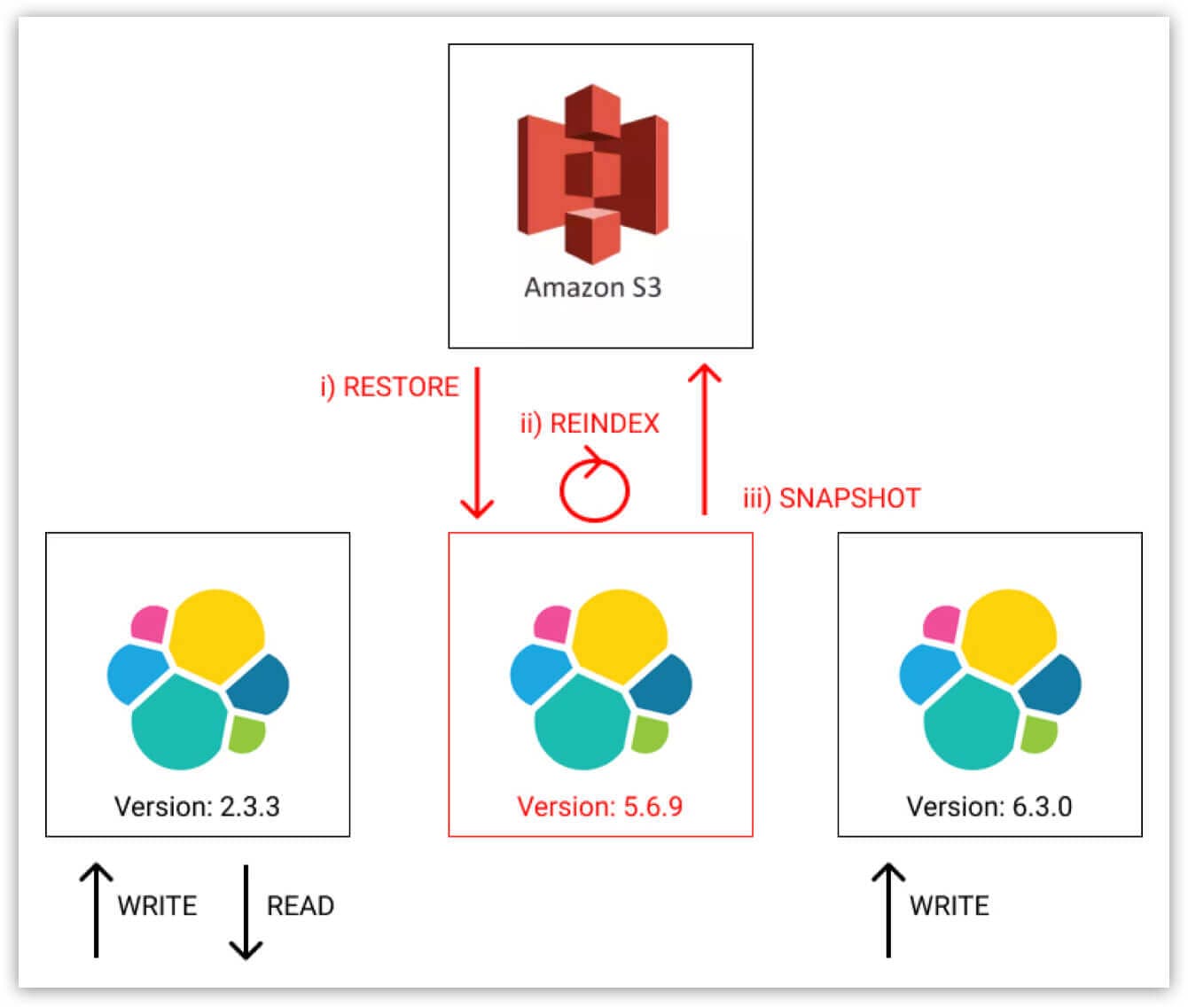
Our process is a two step process: first we upgraded from 2.3.3 to 5.6.9 and then from 5.6.9 to 6.3.0. This was necessary because of our use of snapshot and restore – newer versions of Elasticsearch can only read snapshots created from the current or previous major version.
Before we upgraded Elasticsearch, our clusters had:
- 40 dedicated data nodes
- 3 dedicated master eligible nodes
- 3 dedicated coordinating only nodes
- 10k document per second peak ingestion rate
- 4k document per second peak search rate
- 2.4 billion documents
- 6.8 terabytes of data
How to upgrade Elasticsearch from version 2.3.3. to 6.3.0.
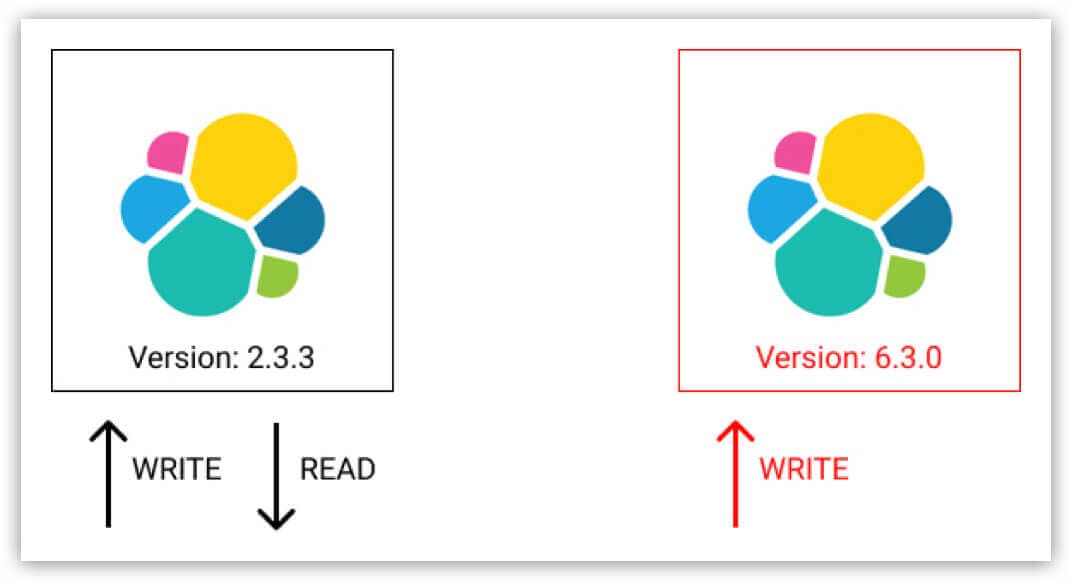
1. Set up a new 6.3.0 cluster with identical hardware and enable dual writing.
Important: It’s crucial not to perform any real deletes on the 6.3.0 cluster while dual writing. If a document is deleted from the 2.3.3 cluster then it should only be marked as deleted in the 6.3.0 cluster. The reason for this is that later we will restore from a backup and we don’t want to restore documents which have been deleted in the meantime. We achieved this constraint by adding a boolean field called “Deleted” to each document. We then transformed deletions into updates during dual writing.
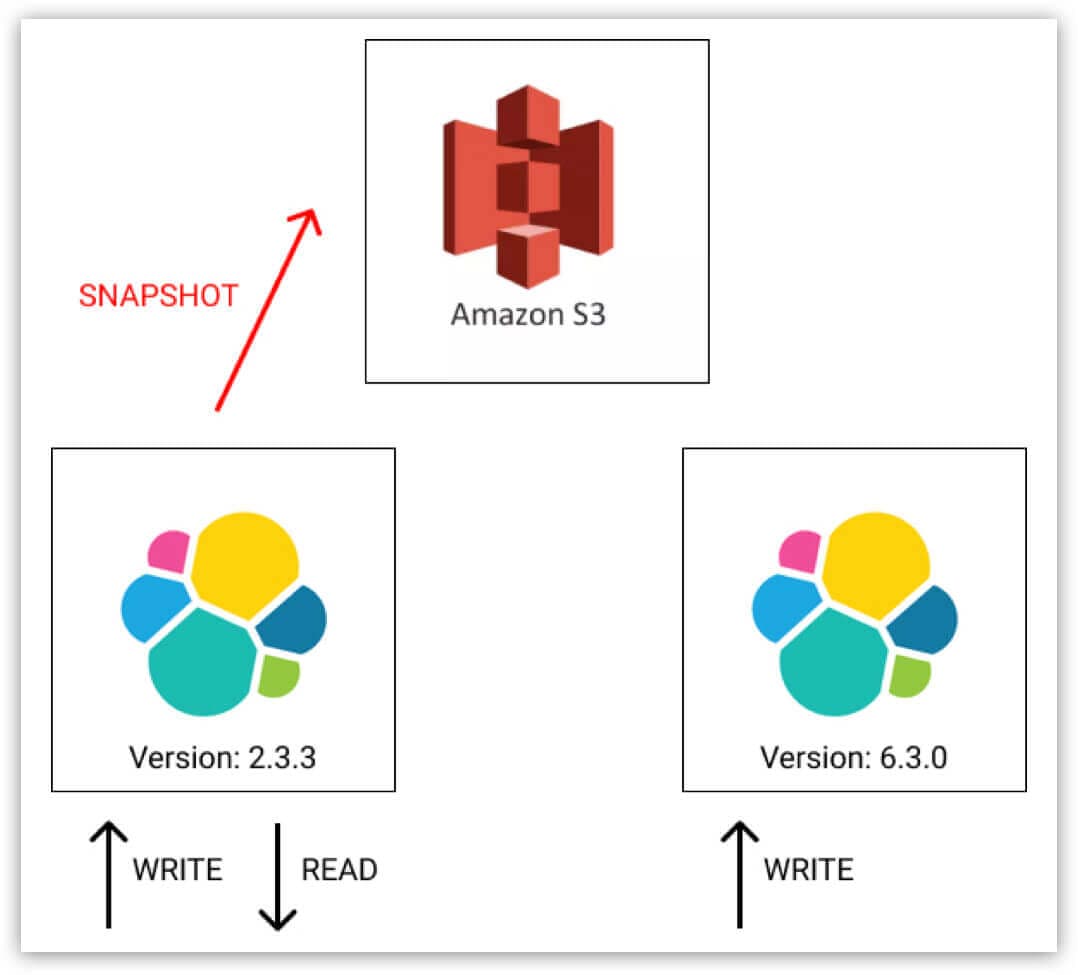
2. Take a snapshot of the old 2.3.3 cluster.
3. Set up a temporary 5.6.9 cluster.
a. Restore from the 2.3.3 snapshot taken in the previous step.
b. Reindex into the Elasticsearch 5x format.
c. Take another snapshot.
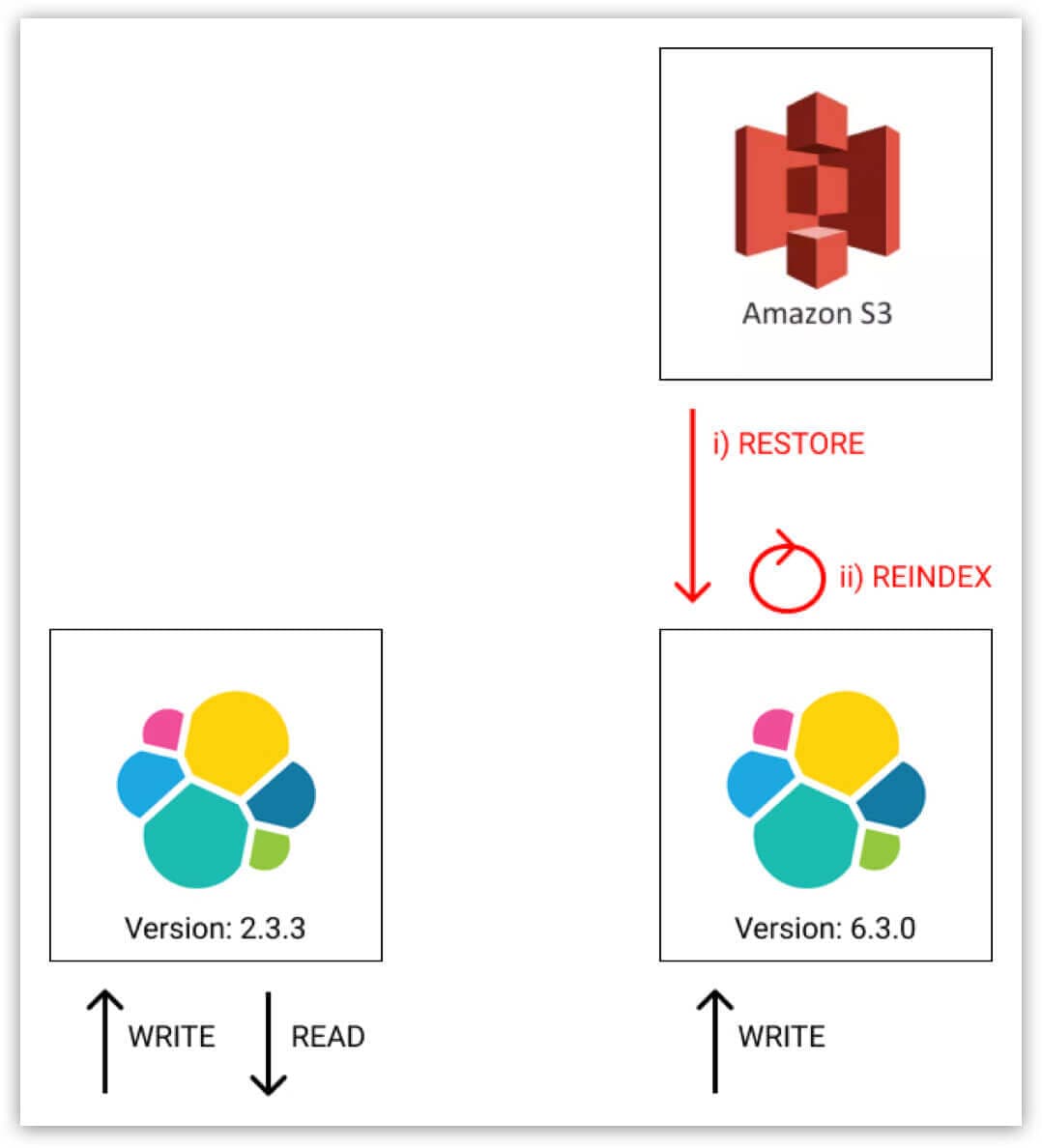
4. Delete the temporary 5.6.9 cluster.
a. Restore from the 5.6.9 snapshot taken in the previous step into a new temporary index.
b. Reindex from the temporary index into the live index, the data will now be in the Elasticsearch 6x format.
c. Delete the temporary index.
Important: If a document exists in the live index then we do not want to overwrite it with an older version during the reindexing operation. To achieve this we set op_type to create, which caused the reindexing to only create missing documents in the target index. All existing documents caused a version conflict so we also added the proceed on conflicts setting.
5. At this point in time we have two identical Elasticsearch clusters. They have the exact same hardware, the exact same data and they are both being kept in sync. We can now at any point switch the read load over to the new cluster and tear down the old cluster.
Important: Before switching over for real, we used Github Scientist to verify that both clusters had a 100% match rate on the read path.
6. Turn off dual writing and make the new cluster the authority for both reads and writes. We can now delete all documents which have the boolean field “Deleted” set to true. We used the delete_by_query API for this.
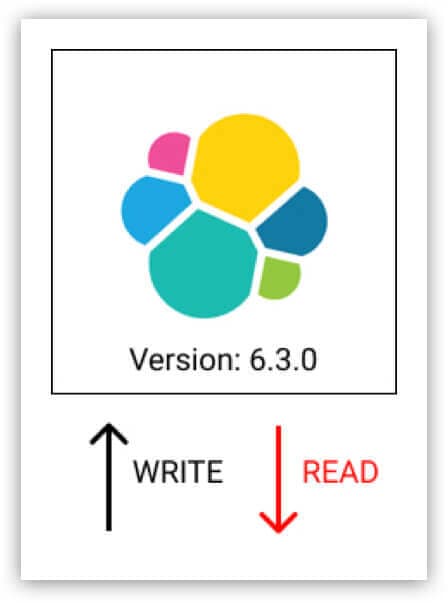
Finally, we can retire the old cluster.
The issues we discovered during the upgrade
We kept the old and new clusters dual writing and dual reading (step 5 above) for more than a week so we could verify that the new cluster was 100% stable and returning the correct documents. This turned out to be a really good idea because we discovered two serious performance issues with both Elasticsearch 5.6.9 and 6.3.0.
Keeping the old cluster around bought us the time we needed to report these issues to Elastic, and work with them on eventually rolling out fixes:
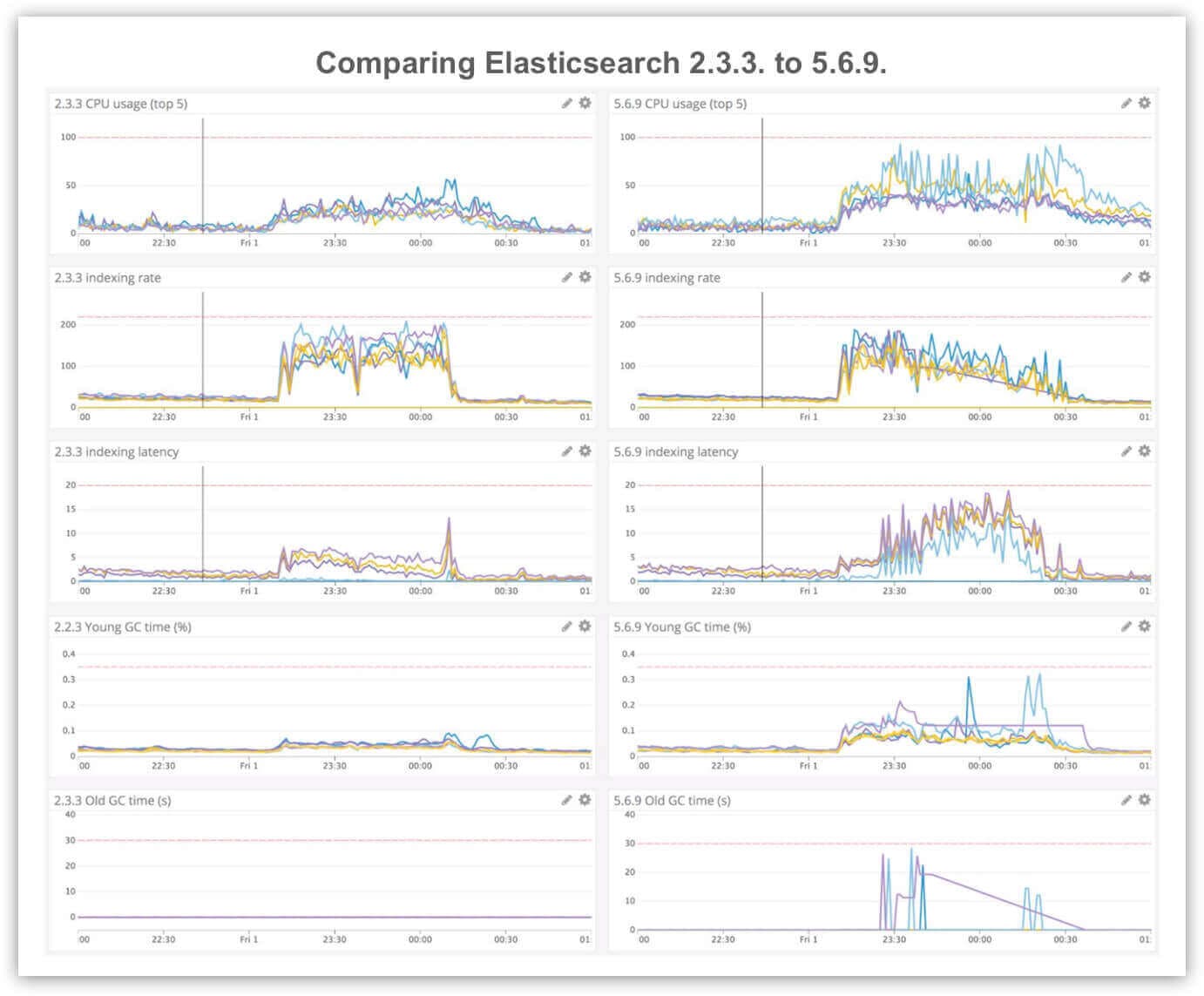
- elastic/elasticsearch/pull/31105: This was an indexing performance regression that affected indexes with a large number of fields. We saw elevated CPU usage on data nodes, really bad ingestion latency and regular stop-the-world garbage collection stalls.
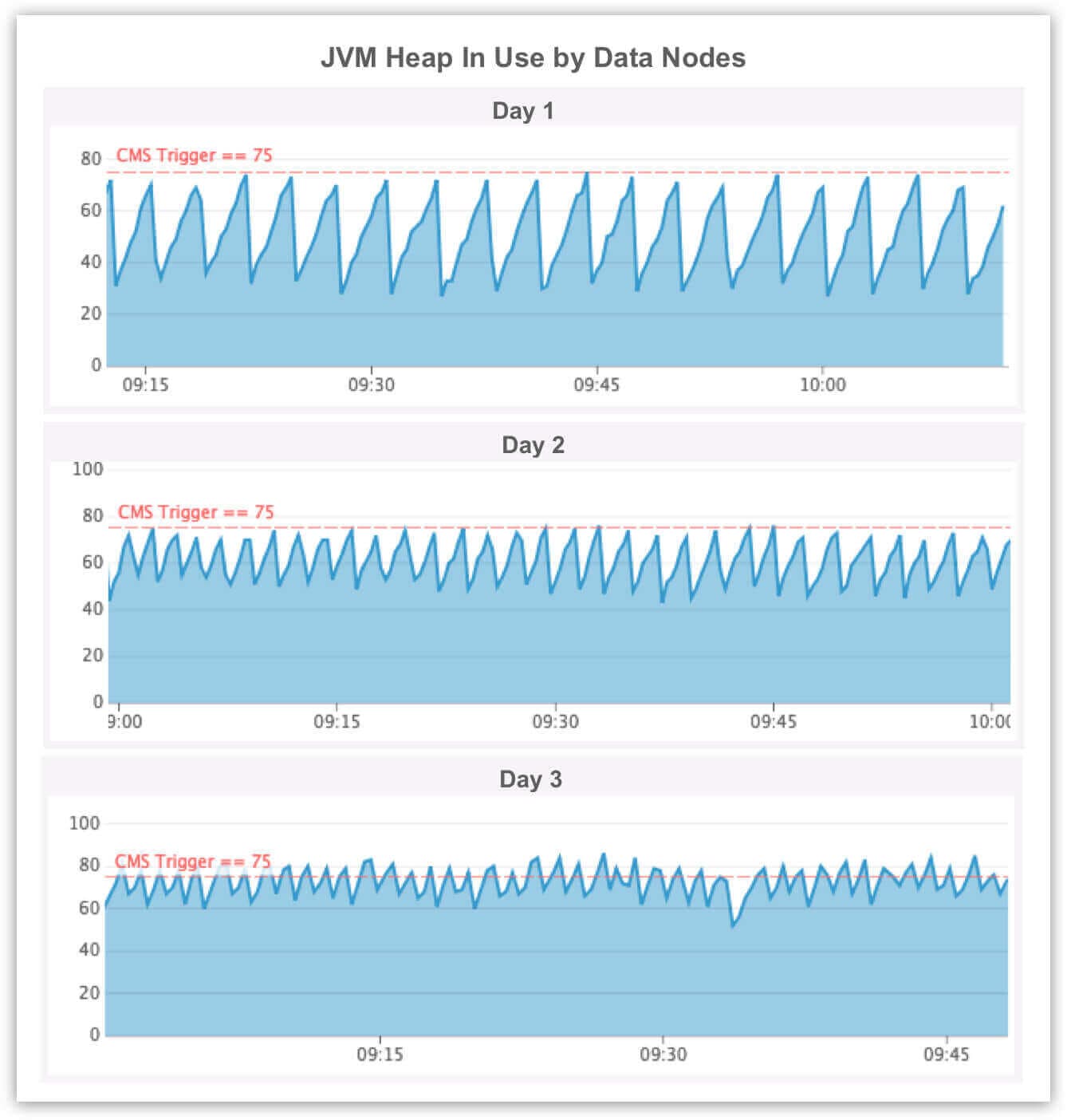
- elastic/elasticsearch/issues/32537: This was a memory leak caused by slow logging. After a few days we started to see regular stop-the-world garbage collection pauses and after five days we saw data nodes completely fall over with OutOfMemory exceptions.
The benefits of upgrading Elasticsearch
The Elasticsearch and Lucene teams have done some incredible work over the past few years.
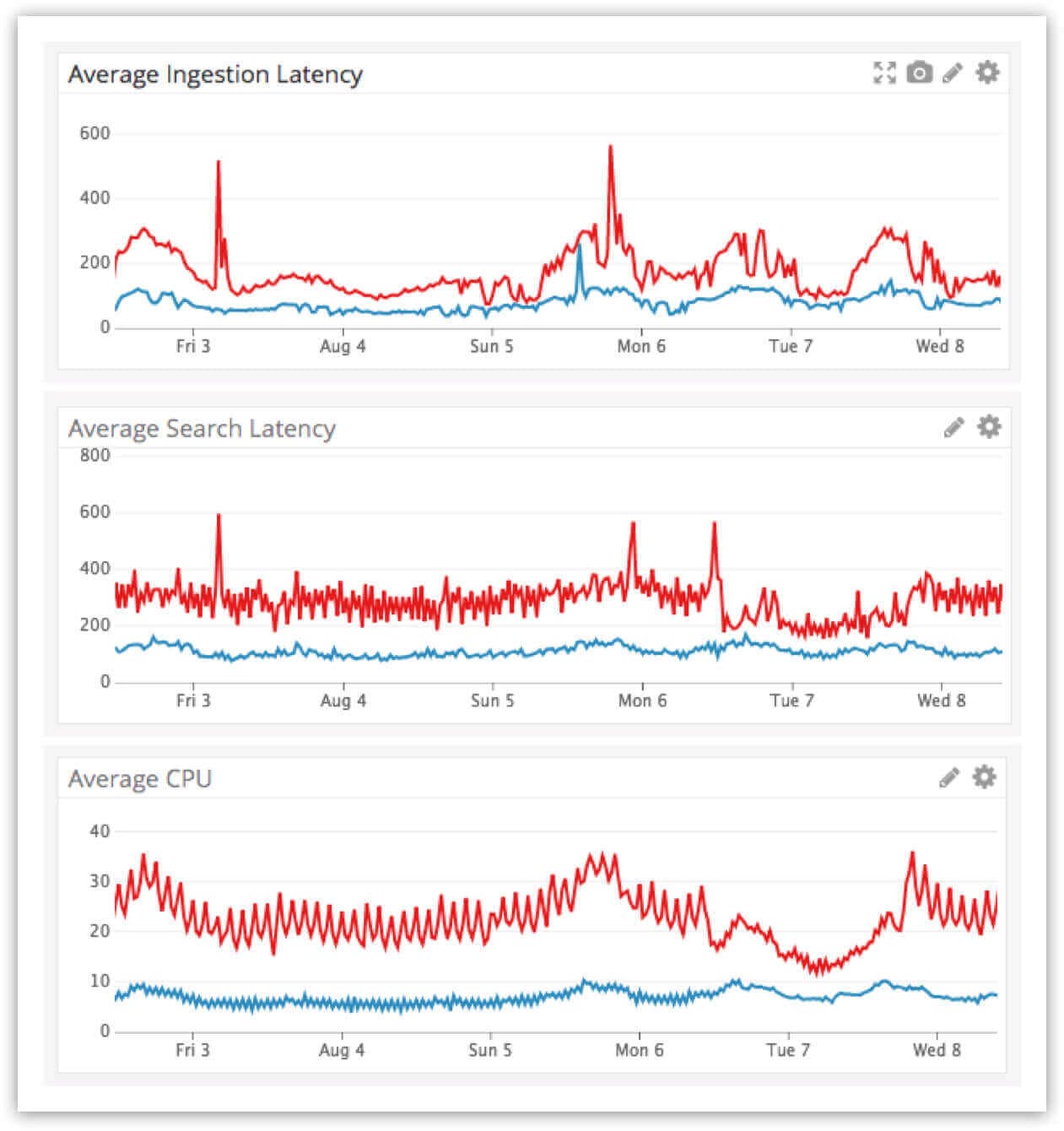
- Performance: The Elasticsearch 5x release was focused on ingestion and search performance. The Elastic blog promised “somewhere between 25% – 80% improvement to indexing throughput,” and we saw exactly this after we applied the two bug fixes that we previously discussed. Most of our clusters showed a greater than 50% improvement in average indexing and search latency and a 40% reduction in average CPU usage.
- Resilience: Elasticsearch 6x was focused on “faster restarts and recoveries with sequence IDs.” This has been a complete game changer for us in terms of cluster maintenance. We now regularly rolling-restart all of our Elasticsearch clusters in order to install security patches and even Linux kernel upgrades. These rolling-restarts are automated and cause zero impact to our clusters which are continuously under both heavy ingestion and search loads.
- Efficiency: Elasticsearch 6.0 also includes Lucene 7.0, which has a major storage benefit in how sparsely populated fields are stored. As a result we saw a massive reduction in disk usage (>40%) across some of our larger clusters.
- Cost: After the version upgrade, our clusters were massively over-provisioned, which enabled us to move to a newer EC2 instance family and reduce our overall instance counts. This was expected, however we made a conscious decision not to change both the hardware and software at the same time. This made it much easier to debug the two performance issues outlined above.
A month after the upgrades we moved from c3.8xlarge to m5d.4xlarge for all of our Elasticsearch data nodes. Due to the combined effects of upgrading both Elasticsearch and EC2 instances, we cut the cost of running Elasticsearch at Intercom in half.
Elasticsearch at Intercom today

It’s now June 2019, and there are 10 Elasticsearch clusters at Intercom, all running the latest and greatest version of Elasticsearch. They are still owned by individual teams because we still believe that product teams should own their own infrastructure, but we now also have a single team for cross cutting concerns like Elasticsearch major version upgrades.